
多模型语音合成平台 · Multi-Model Text-to-Speech Platform
六引擎开源语音合成:声音克隆、声音设计、多角色剧本配音,一个 Web UI 全搞定。 Six open-source TTS engines — voice cloning, voice design, multi-character script dubbing — behind one web UI.





治理规范 / Governance: ReSerendipity/.github/governance
TTS MultiModel 是一个自托管的多引擎语音合成(TTS)平台。它把 VoxCPM2、IndexTTS 2.5、IndexTTS 2.0、OpenVoice、Step-Audio-EditX、Breeze TTS 2 六套本地引擎统一到同一个 FastAPI + HTMX Web 界面里,外加一个 Edge-TTS 在线兜底引擎(CPU 可用),让你在一个工作台里完成声音设计、零样本/极致声音克隆、多角色剧本配音、语音转换与音频编辑,而不必在多个工具之间来回切换。
项目代码以 Apache-2.0 开源,本身不打包任何模型权重——权重由你从各模型官方仓库自行下载,使用前请核对每个模型的许可(见下方「模型许可」)。
- 六引擎统一编排:声明式引擎注册表,VoxCPM2 / IndexTTS 2.5 / IndexTTS 2.0 / OpenVoice / Step-Audio-EditX / Breeze TTS 2 灵活切换;Edge-TTS 在线引擎在无 GPU 时自动兜底。
- 声音克隆:少量参考音频即可零样本克隆;「极致克隆」支持参考音频 + 转写文本做更精细的音色还原。
- 声音设计:用自然语言描述目标音色(如「温柔清晰的女声」)直接生成语音,无需参考音频。
- 剧本配音:多角色对话剧本自动分配说话人,逐条试听、批量合成。
- 流式与批量:长文本 SSE 流式输出;批量任务断点续跑,SQLite 记录全部生成历史。
- 多后端与多语言界面:NVIDIA CUDA / Apple MPS / CPU 自动适配;界面支持中文(简/繁)、英文、日文、韩文。

客户端(Web UI / CLI / OpenAI 兼容 API)→ FastAPI 引擎注册表 → 六套本地引擎 + Edge-TTS 在线兜底 → SQLite 历史 / outputs / personas。
以下截图均由源码启动 python app/clean_launch.py(http://127.0.0.1:7869)实拍,未下载模型权重、未触发合成;引擎未加载时空状态如实呈现。
首次启动引导(onboarding)
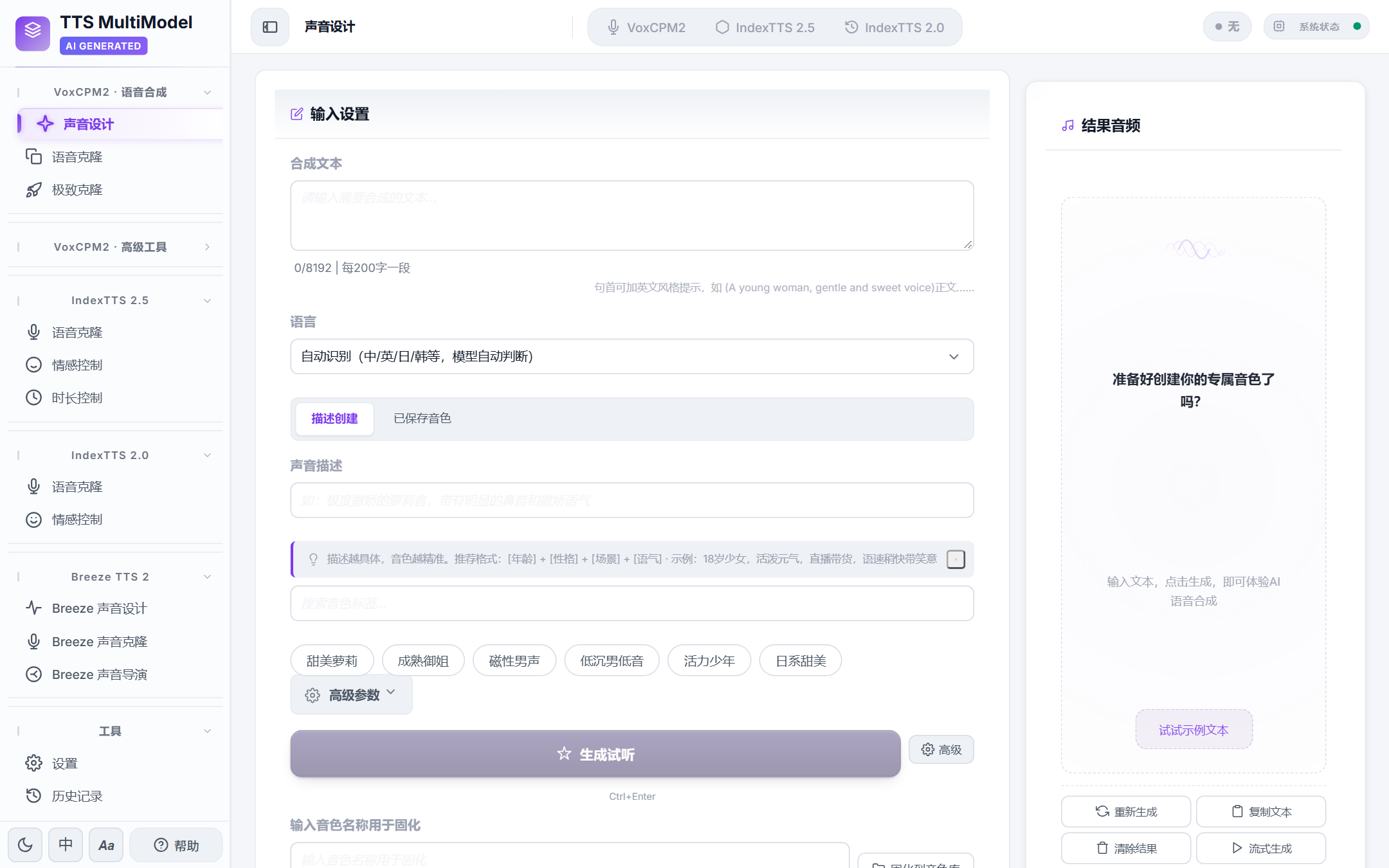
首次引导完成后进入声音设计工作台:左侧引擎与模式导航,中间为合成文本、语言、描述创建/已保存音色、声音描述与音色标签,右侧为结果音频区。
主界面(引导完成后)
| 声音设计工作台 | 声音克隆 |
|---|---|
 |
 |
| 文本描述音色,调节语速/音调/情感后生成。 | 上传参考音频克隆音色,支持已保存音色库。 |
| 剧本工坊(多人对话) | 历史记录 |
|---|---|
 |
 |
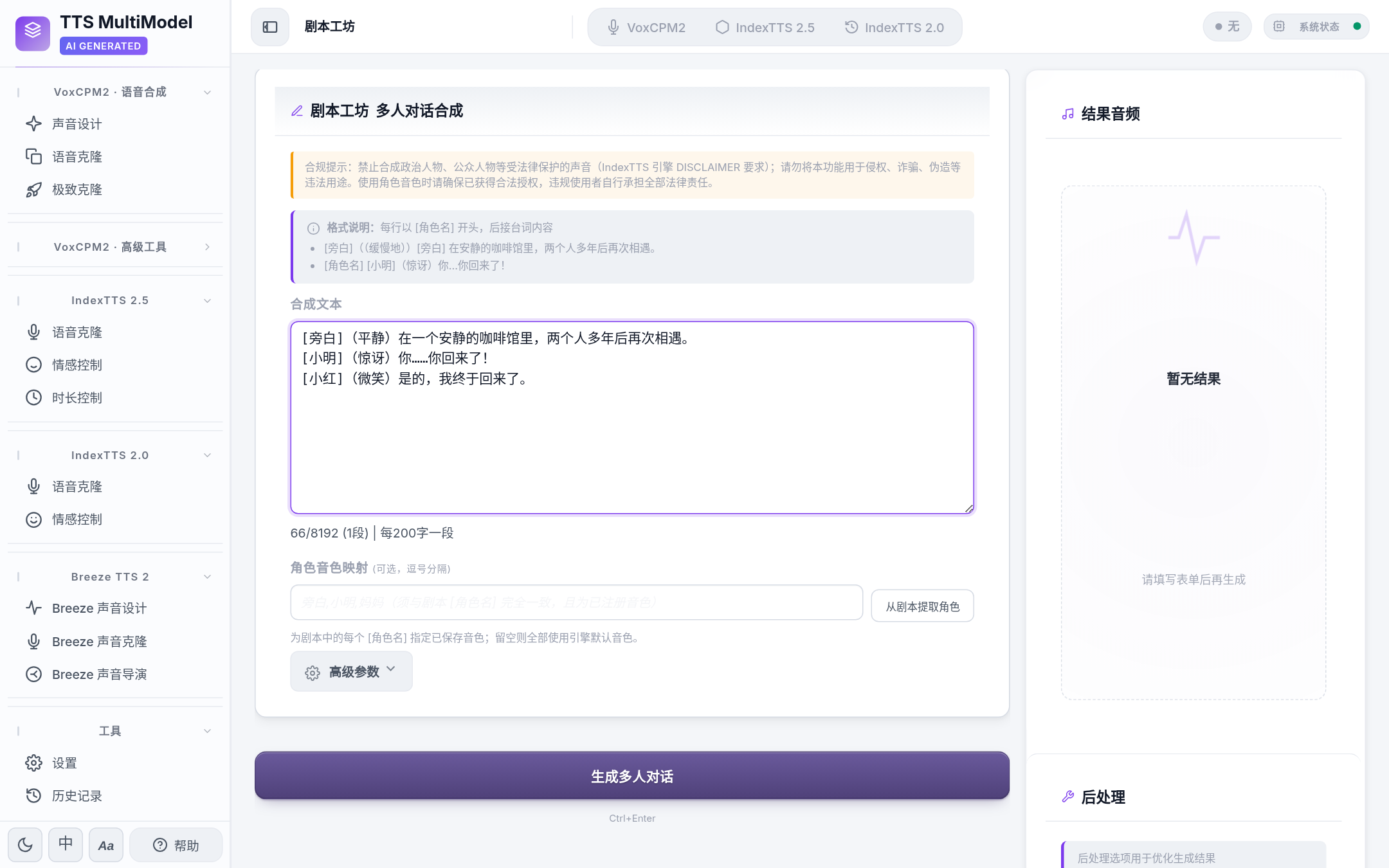
按 [角色名] 台词 格式批量配音,可映射角色音色。 |
SQLite 记录生成历史,支持搜索、筛选、分页。 |
环境要求:Windows 10/11 (64-bit) 或 Linux;Python 3.10+(推荐 3.12);本地引擎建议 NVIDIA GPU(6.5 GB+ 显存),无 GPU 时可用 Edge-TTS 在线引擎体验。
git clone https://github.com/ReSerendipity/TTS-MultiModel.git
cd TTS-MultiModel普通用户可直接下载桌面安装包:Releases →
TTSMultiModel-Setup-v<版本>.exe(单文件,内置便携运行环境,无需另外下载分卷;同批发布.sha256供校验)。以下为从源码运行的路径。
Windows:
install.bat    :: 自动检测系统 Python 或项目内 WinPython,安装依赖并启用 git 钩子
:: 按 scripts/download_models.py 说明下载模型权重后:
start.batLinux:
chmod +x scripts/install.sh && ./scripts/install.sh
./scripts/start.shDocker:
docker compose up -d
# 或拉取随版本发布的 GHCR 镜像;版本以 config.yaml 为准(当前 2.9.0,截至 2026-11-04)
docker pull ghcr.io/reserendipity/tts-multimodel:2.9.0
启动后访问 http://localhost:7869。最小验证:浏览器打开该地址能看到左侧导航与「声音设计」工作台;或命令行运行 tts-multimodel --help(源码直跑为 python app/integrated_app/cli.py --help)。
模型权重需单独下载:
pip install huggingface_hub modelscope后运行python scripts/download_models.py --all(国内镜像优先,失败回退 ModelScope)。
| 项目 | 说明 |
|---|---|
| 操作系统 | Windows 10/11 (64-bit) 或 Linux(macOS 经 MPS 后端可运行,主要在 Windows 上测试) |
| Python | 3.10+,推荐 3.12;或解压便携 WinPython 到项目根目录完全隔离 |
| GPU | 本地引擎推荐 NVIDIA CUDA(6.5 GB+ 显存);Apple Silicon MPS 亦可;纯 CPU 可用 Edge-TTS 在线引擎 |
| 音频组件 | Windows 需自行安装 Visual C++ Redistributable (x64) 与 SoX;Linux/macOS 用包管理器安装 FFmpeg/SoX |
| 容器 | 提供 Dockerfile 与 docker-compose.yml,GPU 部署需 nvidia-docker runtime |
# 声音设计:文本描述直接生成
tts-multimodel design --text "今天天气不错" --control "warm female voice" -o out.wav

# 零样本声音克隆
tts-multimodel clone --text "你好,很高兴认识你" --reference-audio ref.wav -o clone.wav

# 批量合成(TXT/JSON/CSV,可输出 MP3)
tts-multimodel batch --input texts.txt --output-dir ./outs --reference-audio ref.wav --format mp3
CLI 目前覆盖 VoxCPM2 的 design / clone / batch 三种模式;IndexTTS 合成、极致克隆、剧本工坊、音色库、语音转换与音频编辑、LoRA 训练等请使用 Web UI 或 HTTP API(含 OpenAI 兼容的 POST /v1/audio/speech)。
给 AI Agent / 脚本用(结构化输出):任意命令加 --json 可输出单行 JSON 到 stdout(日志走 stderr,可直接 json.loads),并带语义化退出码(0 成功 / 1 业务失败 / 2 参数错误 / 3 环境未就绪):
# 统一服务层入口:--engine 真正生效(voxcpm2 / indextts2)
tts-multimodel generate design --text "你好" --control "warm female voice" --engine voxcpm2 --json
# 返回: {"ok":true,"command":"design","data":{"audio_path":"...","duration":3.5,"engine":"voxcpm2",...}}

# 顶层 design/clone 加 --service 也可走统一服务层(默认仍为 legacy 直调,保持兼容)
tts-multimodel design --service --text "你好" -o out.wav --json
多引擎 / 多动作入口(generate --help 查看全部):
tts-multimodel generate ultimate  --text "..." --reference-audio ref.wav [--ref-text "..."]
tts-multimodel generate emotion   --text "..." --reference-audio ref.wav --emotion-text "开心"
tts-multimodel generate script    --input script.txt --persona-map 旁白=narr.wav
tts-multimodel generate edge      --text "..." --lang zh          # 在线兜底,无需权重
tts-multimodel generate convert   --source-audio a.wav --target-audio b.wav   # 需 openvoice
tts-multimodel generate edit      --source-audio a.wav --source-text "..." --edit-type emotion --edit-info happy
tts-multimodel postprocess        --audio a.wav --tempo 1.1 --enhance
依赖缺失的引擎(如 Breeze / Voicebox / Step-Audio)会返回
NOT_READY(退出码 3)并给出明确指引,不会静默失败。
Breeze 上游要求 transformers 4.57.3 + qwen-tts 0.1.1,而本项目全局锁 transformers>=5.20.2(其它引擎与安全公告所需)。实测在 5.x 兼容层下 Breeze 产物是噪音(人工试听确认);4.57.3 下正常。因此 CLI 在检测到 transformers 5.x 时会自动把 Breeze 生成委托给隔离 venv:
python scripts/setup_breeze_venv.py        # 一键创建(默认 D:/breeze-venv,或项目根 .venv-breeze)
# 也可用 TTS_BREEZE_VENV 环境变量指定已有 venv
tts-multimodel generate breeze-design --text "..." --control "一位低沉成熟的男声" --json
未创建隔离环境时,Breeze 命令返回 NOT_READY 并给出上述指引,不会退回 5.x 噪音路径。环境路径优先级:TTS_BREEZE_VENV > D:/breeze-venv > 项目根 .venv-breeze。
完整命令族(--help 查看每个子命令):
tts-multimodel persona  list|show|save|delete          # 音色库
tts-multimodel history  list|stats|hide|clear|recycle|restore|purge|export|sync
tts-multimodel model    status|load|unload|switch       # 模型生命周期
tts-multimodel engines  list|info                       # 引擎能力发现
tts-multimodel download catalog|status|start|uninstall   # 环境包/模型下载
tts-multimodel lora     list|load|unload|toggle|state    # LoRA 权重
tts-multimodel train    start|stop|log                   # LoRA 微调
tts-multimodel system   health|gpu|logs|settings         # 只读运维视图
tts-multimodel serve                                    # 完整 HTTP:/v1 + SSE + Web UI
serve用于需要 OpenAI 兼容接口(POST /v1/audio/speech)或 SSE 的场景;其余能力均可由 CLI 直调,无需起服务。
CLI 每条命令都是独立进程,generate * 直调时每次都要重新加载模型(约 36–41s)。若本机已有常驻 HTTP 服务(桌面版 GUI 运行时会自动拉起,或手工 tts-multimodel serve 放在后台),generate 与 batch 会自动发现并复用它,单次生成可降到约 7–9s:
tts-multimodel serve --port 7901 &                # 起一次常驻服务(也可用桌面版 GUI)
tts-multimodel generate design --text "你好" --control "calm male voice" --json
# 第 1 次含模型加载(≤60s);此后每次走 HTTP 复用常驻模型(约 7–9s),
# JSON 的 data.transport 字段为 "http"(直调时无此字段),日志可见「发现常驻服务」- 服务发现优先级:
--server URL> 环境变量TTS_CLI_SERVER>app/.server_port(服务启动时自动写入,已 gitignore)。 - 降级保证:没有服务、服务停止或超时时,自动回落现有直调路径(stderr 有一条提示);
--no-remote可强制直调(CI/测试用)。 - 模型自动补载:服务端引擎未加载时,CLI 自动调用一次
/api/model/load并重试一次,仍失败报NOT_READY(3)。 - 走 HTTP 的范围:
generate全部生成类子命令与batch;persona/history/model等毫秒级操作始终直调。generate script --persona-map(角色→任意路径映射)HTTP 端点无法表达,自动回落直调。
未显式指定模型来源时,CLI 按以下优先级解析(load_model):
| 优先级 | 来源 | 触发条件 |
|---|---|---|
| 1 | --model-path <dir> |
用户显式指定本地目录 |
| 2 | --hf-model-id <repo> |
用户显式指定 Hub 仓库(尊重联网意图,不再回退本地) |
| 3 | config.yaml 的 voxcpm2.model_path |
默认:本地权重存在即用(离线可用) |
| 4 | openbmb/VoxCPM2 |
本地也不存在时回落 Hub 默认仓库 |
第 3 步是离线优先的保证。项目交付形态不带 HuggingFace 缓存(桌面包只带
model/),此前实现会无条件走 Hub,导致离线环境下batch等 legacy 命令失败;若 HF 缓存残缺(config.json为空),报错表现为Expecting value: line 1 column 1 (char 0)。generate(service 层)与 HTTP 路径一直读本地权重,此处补齐一致性。
CLI 全功能扩展的架构与分阶段路线图见
docs/adr/0005-cli-full-feature-expansion.md。
桌面安装包用户:安装器会把 tts-multimodel 命令注册到当前用户 PATH(开始菜单也有「TTSMultiModel CLI」快捷方式),因此桌面版同样能直接用上面的命令,无需 pip install。前提是在桌面应用「下载管理」页装好运行环境(torch 家族)与至少一套模型;命令默认使用随包目录下的 VoxCPM2 权重,也可显式传 --model-path / --hf-model-id 覆盖。卸载时安装器会从 PATH 精确移除该条目。若安装前已打开终端/AI Agent,需重开一个会话才能看到新命令。
- 一定要有 GPU 吗? 本地引擎建议 GPU,但项目注册了 Edge-TTS 在线兜底引擎,无 GPU 也能在 CPU 上体验完整界面与在线合成;要跑 VoxCPM2 / IndexTTS 等本地引擎则建议 6.5 GB+ 显存。
- 模型权重从哪里来? 框架本身不含权重。运行
python scripts/download_models.py --all从官方仓库下载到model/对应子目录;也可手动下载。 - LoRA 微调现在能用吗? LoRA 训练链路已随仓库提供(
pip install -e .[training]),但属实验特性、未经真机训练验证,12 GB 显存上训练前需先卸载推理引擎以免 OOM。 - 商用需要注意什么? 项目代码 Apache-2.0 可商用;但各模型权重许可不同——IndexTTS 2.5/2.0 采用 bilibili Model Use License,商用须事先向 bilibili 登记并取得书面授权;Breeze TTS 2 权重与自托管输出仅限研究/非商用,详见
docs/model-cards/。
- 安全策略:docs/SECURITY.md
- 模型卡片与许可:docs/model-cards/
- 运行手册与回滚:docs/SRE_RUNBOOK.md、docs/rollback_sop.md
- 治理规范:ReSerendipity/.github/governance
欢迎报告 Bug(附复现步骤)、提交功能建议或 PR(Fork → 特性分支 → Conventional Commits + DCO Signed-off-by → PR)。安全问题请走 SECURITY.md 披露流程,勿公开开 Issue。使用体验与讨论请到 Discussions。
项目代码基于 Apache License 2.0,Copyright (c) 2026 ReSerendipity。模型权重不随代码分发,各自遵循其官方许可;请勿将本项目用于侵权、伪造或诈骗等违法用途。
本项目是本地自托管工具,不对外提供语音合成服务;生成音频的使用责任由使用者承担。
- 禁止冒充他人:不得用克隆音色冒充真实人物、伪造其言论,或用于诈骗、骚扰、虚假信息传播。
- 输出宜标注为 AI 合成:对外发布合成语音时,请在音频或说明中明示「AI 合成」。《互联网信息服务深度合成管理规定》第十七条要求提供合成人声服务的组织和个人对生成内容作出标识;本工具默认不在输出音频中嵌入水印或来源元数据,标识需由使用者自行添加。
- 克隆前取得授权:克隆他人音色应取得本人同意,不要上传无权使用的参考音频。
TTS MultiModel is a self-hosted, multi-engine Text-to-Speech platform. It unifies six local engines — VoxCPM2, IndexTTS 2.5, IndexTTS 2.0, OpenVoice, Step-Audio-EditX, and Breeze TTS 2 — behind a single FastAPI + HTMX web UI, with an optional Edge-TTS online fallback engine that runs on CPU. One workbench covers voice design, zero-shot / ultimate voice cloning, multi-character script dubbing, voice conversion, and audio editing.
The code is Apache-2.0 and ships with no model weights. You download weights from each model's official repository and comply with that model's own license before use (see "Model licenses" below).
- Six engines, one registry: VoxCPM2 / IndexTTS 2.5 / IndexTTS 2.0 / OpenVoice / Step-Audio-EditX / Breeze TTS 2, switched from a declarative registry; Edge-TTS acts as a CPU-friendly online fallback.
- Voice cloning: zero-shot cloning from a short reference clip; "ultimate clone" pairs reference audio with its transcript for finer timbre fidelity.
- Voice design: describe the target timbre in plain language (e.g. "warm, clear female voice") and synthesize without any reference audio.
- Script dubbing: assign speakers line by line in a multi-character script and batch-render all lines.
- Streaming & batching: SSE streaming for long text; batch jobs resume from checkpoints, with all history kept in SQLite.
- Multi-backend, multi-language UI: NVIDIA CUDA / Apple MPS / CPU auto-detected; UI ships in Simplified/Traditional Chinese, English, Japanese, and Korean.
Clients (web UI / CLI / OpenAI-compatible API) → FastAPI engine registry → six local engines + Edge-TTS online fallback → SQLite history / outputs / personas.
Captured live from source: python app/clean_launch.py on http://127.0.0.1:7869. No model weights downloaded, no synthesis triggered; empty states are shown as-is with engines unloaded.
First-run onboarding
After the first-run walkthrough, the Voice Design workbench: engine and mode navigation on the left; synthesis text, language, description tabs, voice description and timbre tags in the center; result audio panel on the right.
Main UI (after onboarding)
| Voice design workbench | Voice cloning |
|---|---|
|
|
| Describe the timbre, tune speed/pitch/emotion, then generate. | Upload a reference clip to clone a voice; saved personas library included. |
| Script workshop (multi-character) | Generation history |
|---|---|
|
|
Batch dub lines as [character] dialogue, map character voices. |
SQLite generation history with search, filter, and pagination. |
Requirements: Windows 10/11 (64-bit) or Linux; Python 3.10+ (3.12 recommended); a NVIDIA GPU with 6.5 GB+ VRAM for local engines, or Edge-TTS online fallback on CPU.
git clone https://github.com/ReSerendipity/TTS-MultiModel.git
cd TTS-MultiModel
Regular users can grab the desktop installer from Releases:
TTSMultiModel-Setup-v<version>.exe(single file, bundled portable runtime, no separate data parts; a matching.sha256is published alongside). Below is the from-source path.
Windows:
install.bat    :: auto-detects system Python or bundled WinPython, installs deps, enables git hooks
:: download model weights per scripts/download_models.py, then:
start.batLinux:
chmod +x scripts/install.sh && ./scripts/install.sh
./scripts/start.shDocker:
docker compose up -d
# or pull the versioned GHCR image; tag follows config.yaml (currently 2.9.0, as of 2026-11-04)
docker pull ghcr.io/reserendipity/tts-multimodel:2.9.0
Then open http://localhost:7869. Sanity check: the left sidebar and the "Voice design" workbench render in the browser, or run tts-multimodel --help (from source: python app/integrated_app/cli.py --help).
Weights are downloaded separately:
pip install huggingface_hub modelscope, thenpython scripts/download_models.py --all(mirror-first, falling back to ModelScope).
| Item | Details |
|---|---|
| OS | Windows 10/11 (64-bit) or Linux (macOS runs via the MPS backend; primary testing is on Windows) |
| Python | 3.10+, 3.12 recommended; or extract portable WinPython into the repo root for full isolation |
| GPU | Local engines prefer NVIDIA CUDA (6.5 GB+ VRAM); Apple MPS works; Edge-TTS online engine runs on CPU |
| Audio | Windows needs the VC++ Redistributable (x64) and SoX; Linux/macOS use package-manager FFmpeg/SoX |
| Containers | Dockerfile + docker-compose.yml provided; GPU deployment needs the nvidia-docker runtime |
# Voice design: synthesize from a text description
tts-multimodel design --text "Good weather today." --control "warm female voice" -o out.wav

# Zero-shot voice clone
tts-multimodel clone --text "Nice to meet you." --reference-audio ref.wav -o clone.wav

# Batch synthesis (TXT/JSON/CSV, MP3 output)
tts-multimodel batch --input texts.txt --output-dir ./outs --reference-audio ref.wav --format mp3
The CLI currently covers VoxCPM2 design / clone / batch. IndexTTS synthesis, ultimate clone, script workshop, personas, voice conversion/audio editing, and LoRA training are available via the web UI or the HTTP API (including the OpenAI-compatible POST /v1/audio/speech).
- Do I need a GPU? Local engines prefer one, but the registered Edge-TTS fallback lets you explore the full UI on CPU; run VoxCPM2 / IndexTTS etc. with 6.5 GB+ VRAM.
- Where do model weights come from? The framework bundles none. Run
python scripts/download_models.py --allto fetch them into the matchingmodel/subdirectories, or download manually. - Is LoRA training ready? The training path ships in-repo (
pip install -e .[training]) but is experimental and not yet validated on real hardware; unload inference engines first on a 12 GB card to avoid OOM. - Can I use this commercially? The code is Apache-2.0, but weight licenses differ — IndexTTS 2.5/2.0 use the bilibili Model Use License and require prior written registration for commercial use; Breeze TTS 2 weights and self-hosted outputs are research/non-commercial only. See
docs/model-cards/.
- Security policy: docs/SECURITY.md
- Model cards & licenses: docs/model-cards/
- Runbook & rollback: docs/SRE_RUNBOOK.md, docs/rollback_sop.md
- Governance: ReSerendipity/.github/governance
Bug reports (with repro steps), feature requests, and PRs are welcome (Fork → feature branch → Conventional Commits with DCO Signed-off-by → PR). For security issues, follow the disclosure process in SECURITY.md rather than opening a public issue. Questions and show-and-tell belong in Discussions.
Project code is licensed under Apache License 2.0, Copyright (c) 2026 ReSerendipity. Model weights are not bundled and follow their own licenses; please do not use this project for infringement, forgery, fraud, or any unlawful purpose.
This project is a self-hosted local tool, not a hosted synthesis service; responsibility for generated audio lies with the operator.
- No impersonation: do not clone a voice to impersonate a real person, fabricate their statements, or use it for fraud, harassment, or disinformation.
- Label outputs as AI-generated: when publishing synthesized speech, state that it is AI-generated. Article 17 of China's Deep Synthesis Regulation requires providers of synthetic-voice services to label generated content; this tool does not embed watermarks or provenance metadata in the audio by default, so the label must be added by the operator.
- Get consent before cloning: obtain the speaker's permission and do not upload reference audio you have no right to use.
如果这个项目对你有帮助 / If this project is useful, please star it. ⭐