MapTiler provider for the MapConductor React SDK. Renders a MapTiler Cloud map (via MapLibre GL JS) through MapConductor's provider-independent camera, marker, and overlay API, so the same application code can also run on Google Maps, MapLibre, Mapbox, Leaflet, OpenLayers, ArcGIS, Cesium, HERE, or TomTom.
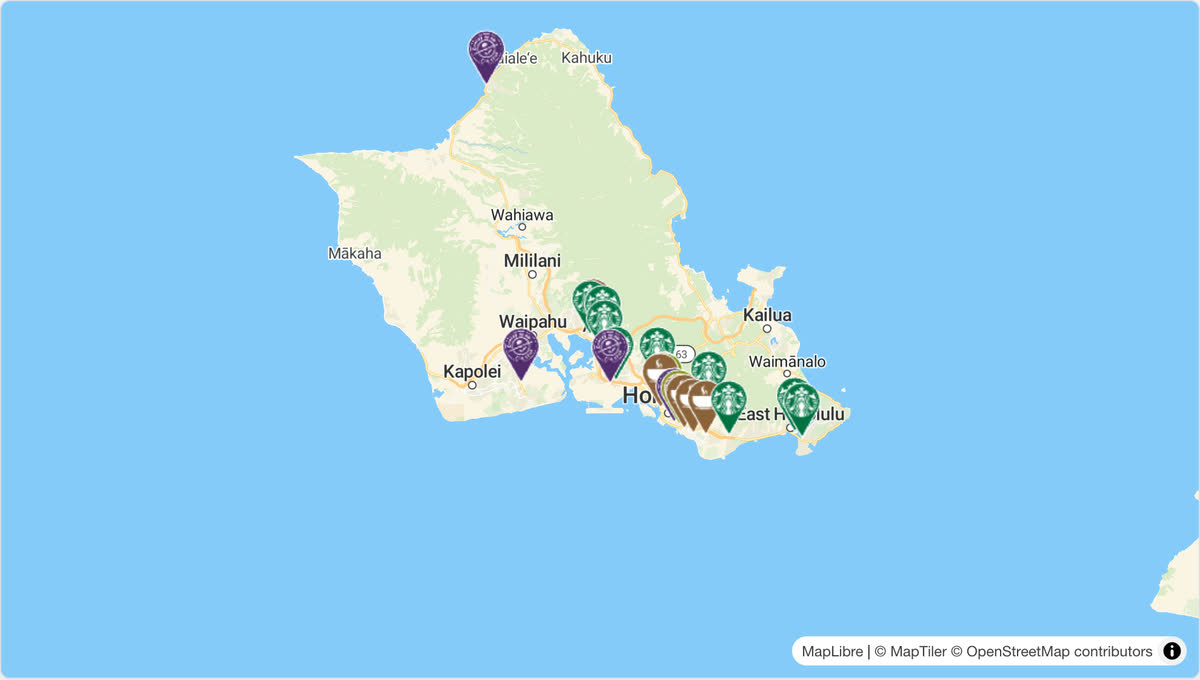
Open it in the live demo: the same store map runs on every provider, and the page switches between them. The code, cut down to three stores:
import { useMemo, useState } from 'react';
import {
  createGeoPoint,
  createMapCameraPosition,
  createMarkerState,
  type MarkerState,
} from '@mapconductor/js-sdk-core';
import { InfoBubble, Markers } from '@mapconductor/js-sdk-react';
import { MapTilerDesign, MapTilerMapView2D, useMapTilerViewState } from '@mapconductor/react-for-maptiler';
import '@mapconductor/react-for-maptiler/style.css';

const STORES = [
  { id: 'waikiki', name: 'Waikiki', latitude: 21.2793, longitude: -157.8292 },
  { id: 'kailua', name: 'Kailua', latitude: 21.3972, longitude: -157.7394 },
  { id: 'haleiwa', name: 'Haleiwa', latitude: 21.5928, longitude: -158.1034 },
];

const INITIAL_CAMERA = createMapCameraPosition({
  position: createGeoPoint({ latitude: 21.38, longitude: -157.93 }),
  zoom: 10,
});

export default function App() {
  const mapViewState = useMapTilerViewState({
    apiKey: 'YOUR_MAPTILER_API_KEY',
    mapDesignType: MapTilerDesign.Streets,
    cameraPosition: INITIAL_CAMERA,
  });
  const [selected, setSelected] = useState<MarkerState | null>(null);
  const markers = useMemo(
    () =>
      STORES.map(store =>
        createMarkerState({
          id: store.id,
          position: createGeoPoint({ latitude: store.latitude, longitude: store.longitude }),
          extra: store,
          onClick: marker => setSelected(marker),
        }),
      ),
    [],
  );

  return (
    <div style={{ width: '100%', height: '100vh' }}>
      <MapTilerMapView2D state={mapViewState} onMapClick={() => setSelected(null)}>
        <Markers states={markers} />
        {selected && (
          <InfoBubble marker={selected}>
            <strong>{(selected.extra as (typeof STORES)[number]).name}</strong>
          </InfoBubble>
        )}
      </MapTilerMapView2D>
    </div>
  );
}
Replace YOUR_MAPTILER_API_KEY with your own key.
npm install @mapconductor/react-for-maptiler @mapconductor/js-sdk-core @mapconductor/js-sdk-reactmaplibre-gl (v6) is bundled as a dependency and does the actual rendering.
MapTiler tiles require a MapTiler Cloud API key. Pass it to the view state:
const state = useMapTilerViewState({
  apiKey: MAPTILER,
  mapDesignType: MapTilerDesign.Streets,
  cameraPosition,
});import {
MapTilerDesign,
MapTilerMapView2D,
useMapTilerViewState,
} from '@mapconductor/react-for-maptiler';
import '@mapconductor/react-for-maptiler/style.css';
import { MapCameraPosition, createGeoPoint } from '@mapconductor/js-sdk-core';
// Your own key. Read it from your environment however your build tool does
// it, and keep it out of source control.
const MAPTILER = '…';
function Map() {
const state = useMapTilerViewState({
apiKey: MAPTILER,
mapDesignType: MapTilerDesign.Streets,
cameraPosition: MapCameraPosition.create({
position: createGeoPoint({ latitude: 35.6812, longitude: 139.7671 }),
zoom: 11,
}),
});
return <MapTilerMapView2D state={state} />;
}MapTiler renders through MapLibre GL JS. MapLibre GL JS v6 is ESM-only and loads
its Web Worker from a URL. With a bundler (Vite, webpack, esbuild, Rollup) that
URL must be registered once, before the first map is created. This package
re-exports maplibre's setWorkerUrl as setMapTilerWorkerUrl so you can do it
without importing maplibre-gl directly — useful when you depend on
@mapconductor/react-for-maptiler alone:
// Vite
import { setMapTilerWorkerUrl } from '@mapconductor/react-for-maptiler';
import workerUrl from 'maplibre-gl/dist/maplibre-gl-worker.mjs?worker&url';

setMapTilerWorkerUrl(workerUrl);
// webpack 5+ / esbuild / Rollup (after copying the worker next to your bundle)
import { setMapTilerWorkerUrl } from '@mapconductor/react-for-maptiler';
setMapTilerWorkerUrl(new URL('maplibre-gl/dist/maplibre-gl-worker.mjs', import.meta.url).toString());In many setups (e.g. Vite) MapLibre GL v6 resolves the worker automatically and
this call is unnecessary. It is also redundant if you already register the
worker through @mapconductor/react-for-maplibre in the same app: both share the
single deduped maplibre-gl instance, so one registration covers both. For SSR
with Vite, add maplibre-gl to ssr.noExternal so the worker-URL import
resolves through Vite.
MapTilerDesign exposes MapTiler Cloud reference styles, mirroring the android
MapTilerDesign: Streets, StreetsDark, StreetsLight, Basic, Bright,
Satellite, Outdoor, Winter, Topo, Toner, Dataviz, Backdrop,
Ocean, Landscape, Aquarelle, OpenStreetMap.
Apache-2.0